What is Headless WordPress? And how to use WordPress
If you are a coder and trying to make a website by using multiple programming languages and frameworks, then WordPress headless is best for you. Because headless WordPress is an architecture where WordPress is used only as a backend content management system (CMS), while the frontend is built using a separate technology like React, Next.js, Vue.js, or Gatsby
In a traditional WordPress setup, the frontend and backend are connected. WordPress uses PHP to generate HTML pages. In a headless approach:
Backend WordPress manages content via REST API or GraphQL.
Frontend Custom App Fetches data from WordPress API and renders it dynamically.
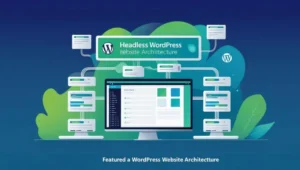
How Headless WordPress Works
- Content Creation (WordPress Admin) You create posts, pages, and custom fields as usual.
- API Layer (REST API or WPGraphQL) WordPress exposes content via API endpoints.
- Frontend (JavaScript Framework) A separate app (e.g., Next.js, React) fetches data and renders the UI.
Key Benefits of Headless WordPress
Better Performance: Static sites or server-rendered apps (Next.js) load faster.
More Flexibility: Use any frontend tech (React, Vue, Svelte) instead of PHP themes.
Enhanced Security: No direct PHP/database exposure reduces hack risks.
Omnichannel Publishing: Deliver content to websites, mobile apps, IoT devices, etc.
Scalability: Handle high traffic better with CDN & static hosting (Vercel, Netlify).
Popular Headless WordPress Stacks
Frontend Framework Use Case
Next.js (React) Best for SEO, hybrid static/dynamic sites
Gatsby (React) Blazing-fast static sites
Nuxt.js (Vue) Vue-based SSR/static sites
SvelteKit: Lightweight, modern frontends
Flutter/React Native Mobile apps powered by WordPress
Challenges of Headless WordPress
Harder Setup Requires JavaScript/API knowledge.
No Built-in Themes: Must build the UI from scratch.
Plugin Limitations: Some WordPress plugins rely on PHP/themes.
More Maintenance: Managing two systems (backend + frontend).

Who Should Use Headless WordPress?
Developers building high-performance websites.
Companies need multi-platform content (web, mobile, kiosks).
Teams using modern JavaScript frameworks (React, Vue).
Projects where security & scalability are critical.
Getting Started with HL WordPress
- Set up WordPress (self-hosted or WP Engine).
- Enable REST API (built-in) or install WPGraphQL.
- Choose a frontend framework (Next.js is trending in 2025).
- Fetch data (`fetch` or Apollo Client for GraphQL).
- Deploy (Vercel, Netlify, or traditional hosting).
learn more with relevant topics
How to fix Elementor error step by step